
BreVox Group
BreVox Group is an independent tech company that creates premium, ready-to-deploy software for modern businesses. We design powerful tools that automate workflows, simplify data management, and solve operational bottlenecks from day one. Our ecosystem gives organizations immediate access to scalable technology that easily integrates into any existing digital environment.
BreVox Systems Overview
BreVox Systems is a dedicated software development lab focused on creating practical, ready-to-use digital tools. While our flagship product is the VentraDocFlux document management system, our engineering team develops everything from automated utilities to mobile applications and custom scripts.
We aim to build a comprehensive, ever-expanding ecosystem of software that businesses can instantly license and deploy. For larger organizations, we offer scalable enterprise plans, making it easy to roll out our infrastructure across specialized divisions without the headache.
System Description
Document Management for Engineering & Construction
VentraDocFlux (VDF) is a document management system built for engineering and construction teams. It manages the full document lifecycle — check-out, revisions, approvals — for CAD drawings, Office documents, PDFs, and scanned images alike, alongside purpose-built modules for Model Coordination (IFC/BIM), Transmittals, Supplier Document Tracking, and a mobile Field app for Punch Lists, Safety Observations, and Inspections on-site. Every file type is also searchable by its actual content, not just its name: scanned drawings through offline OCR, Word and Excel documents directly, and AutoCAD drawings through the VDF plugin. The app itself works in English, Afrikaans, French, Portuguese, Spanish, and German. Naming conventions and approval workflows are fully configurable to match how your team already works — or, if you would rather start from a standards-based setup, VDF ships with a built-in ISO 19650 naming and workflow template you can apply in one click and adjust from there.
- Platform
- Windows desktop app
- File types
- DWG, DGN, PDF, Word, Excel, Text, JPEG, TIFF & more
- Languages
- English, Afrikaans, French, Portuguese, Spanish, German
- Plugins
- AutoCAD (2024–2027) · Word · Excel
- Field access
- Mobile web app (no install)
- Licensing
- Per-seat, admin-managed
- Model coord.
- IFC / BCF
- Field modules
- 5
- Audit trail
- Full history
Product Walkthrough
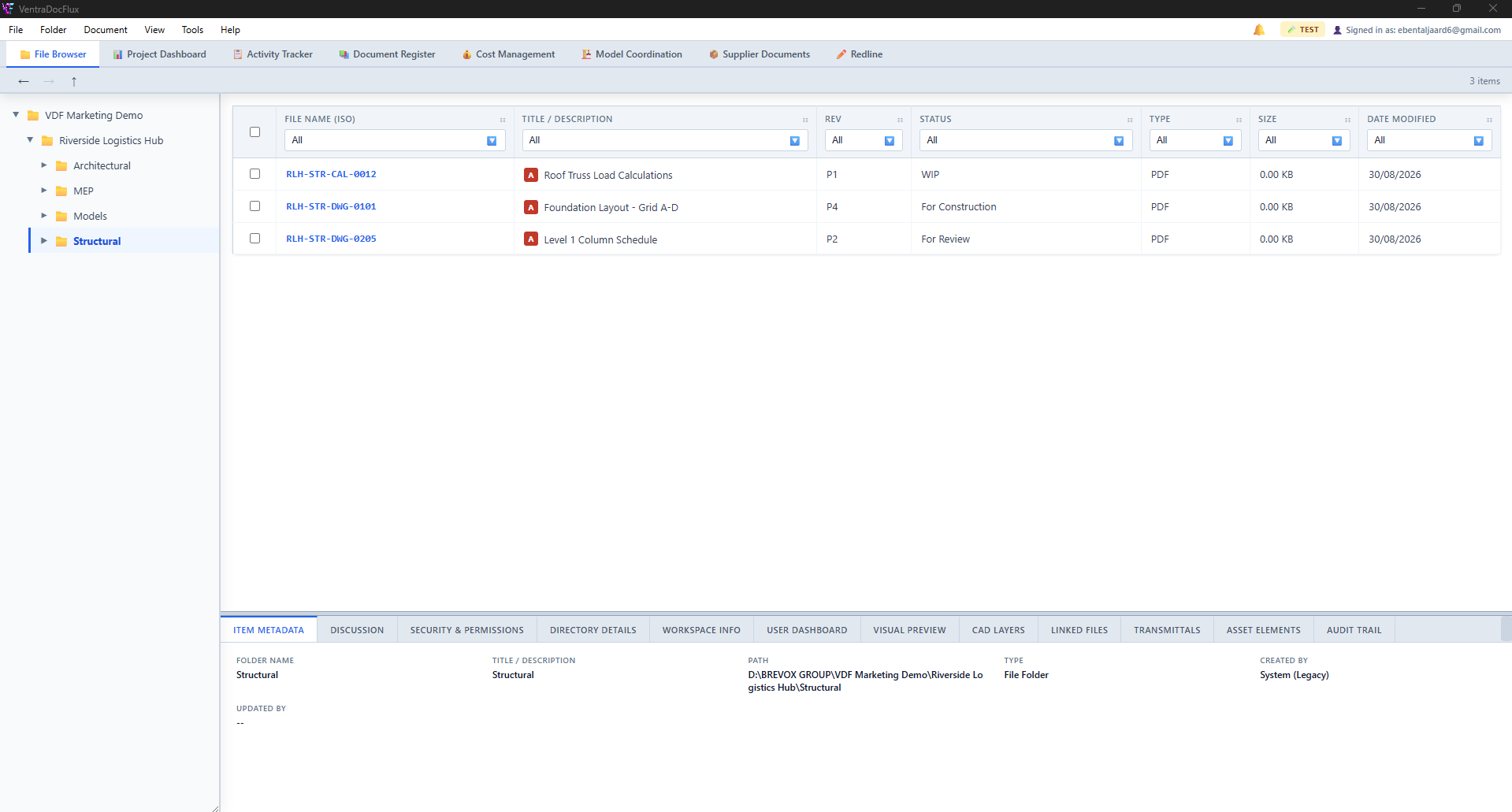
Every document in a project — number, revision, and workflow status — in one register. Check documents in and out, promote them through your approval workflow (WIP → Shared → Approved/Published, or however your Environment Profile defines it), and see a full audit trail per document without leaving this screen.
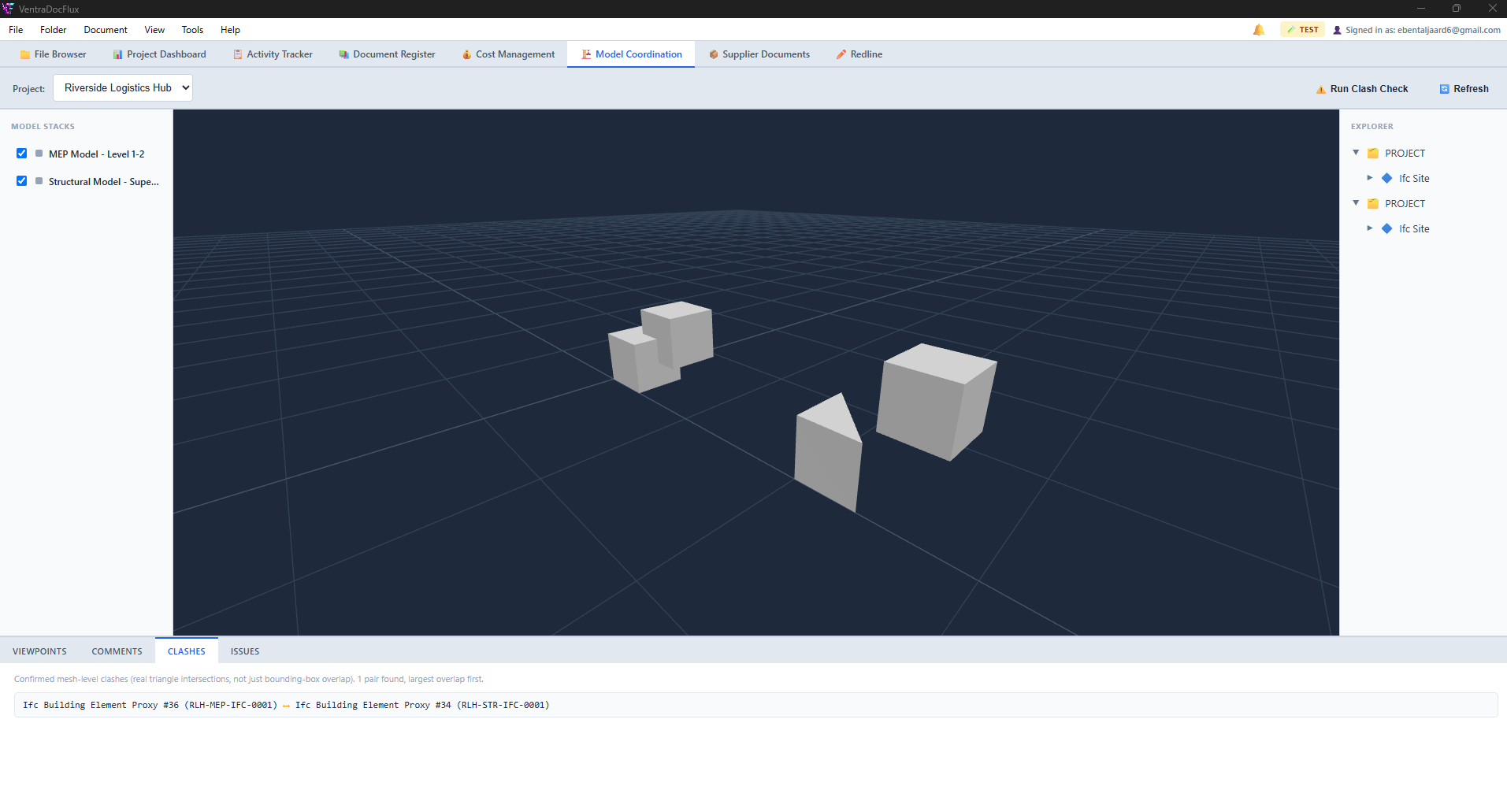
Load IFC models straight into a 3D viewer and stack multiple disciplines in one scene — structural against MEP, for example. Pin comments to a specific point in the model, save viewpoints to come back to, and run automated clash detection between models to catch coordination issues before they reach site.
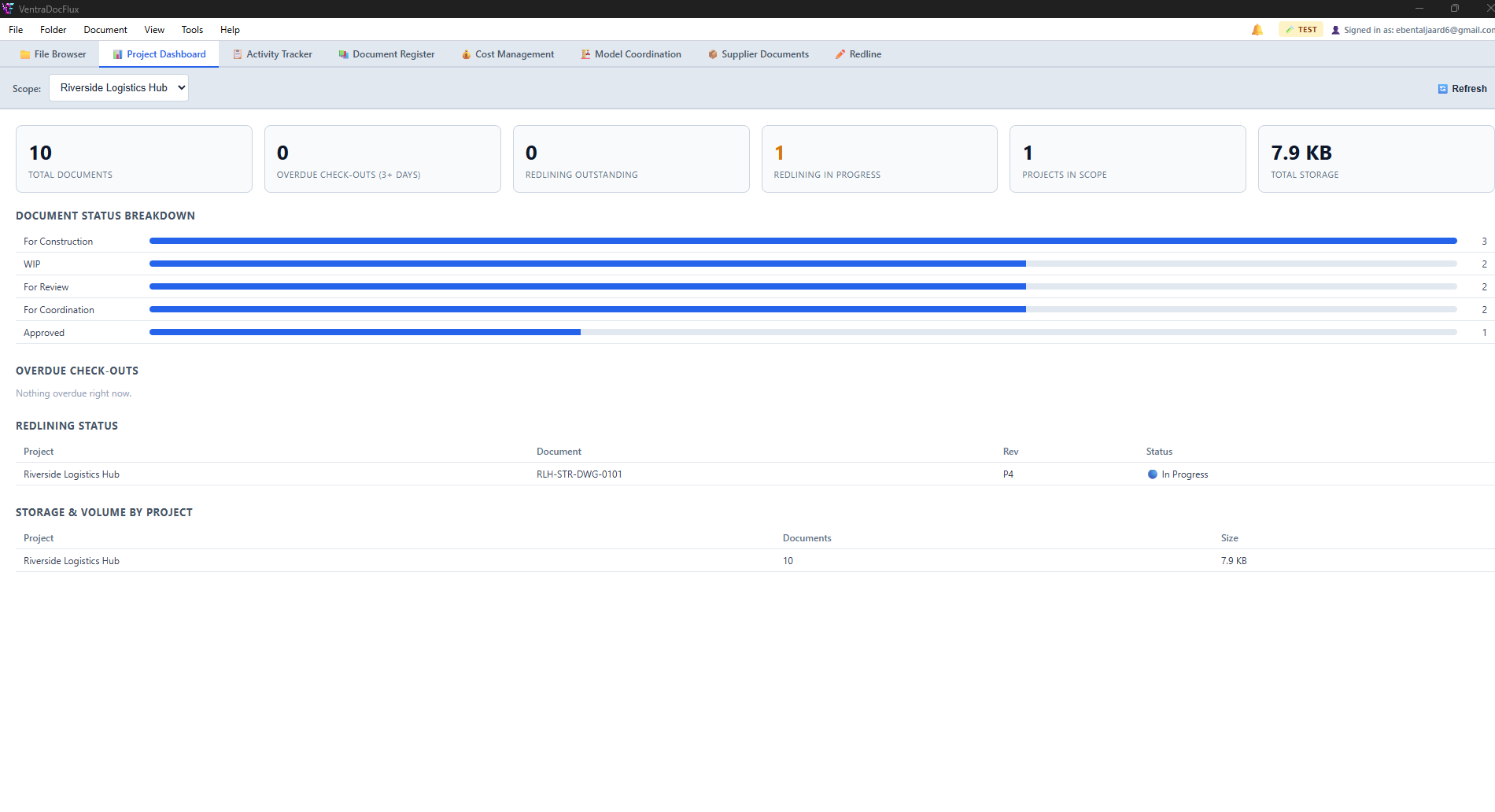
A live overview of a project (or your whole database) — documents by workflow status, checkouts sitting overdue for follow-up, and redlines still outstanding or in progress. Built entirely from real document data, so there is nothing separate to keep updated.
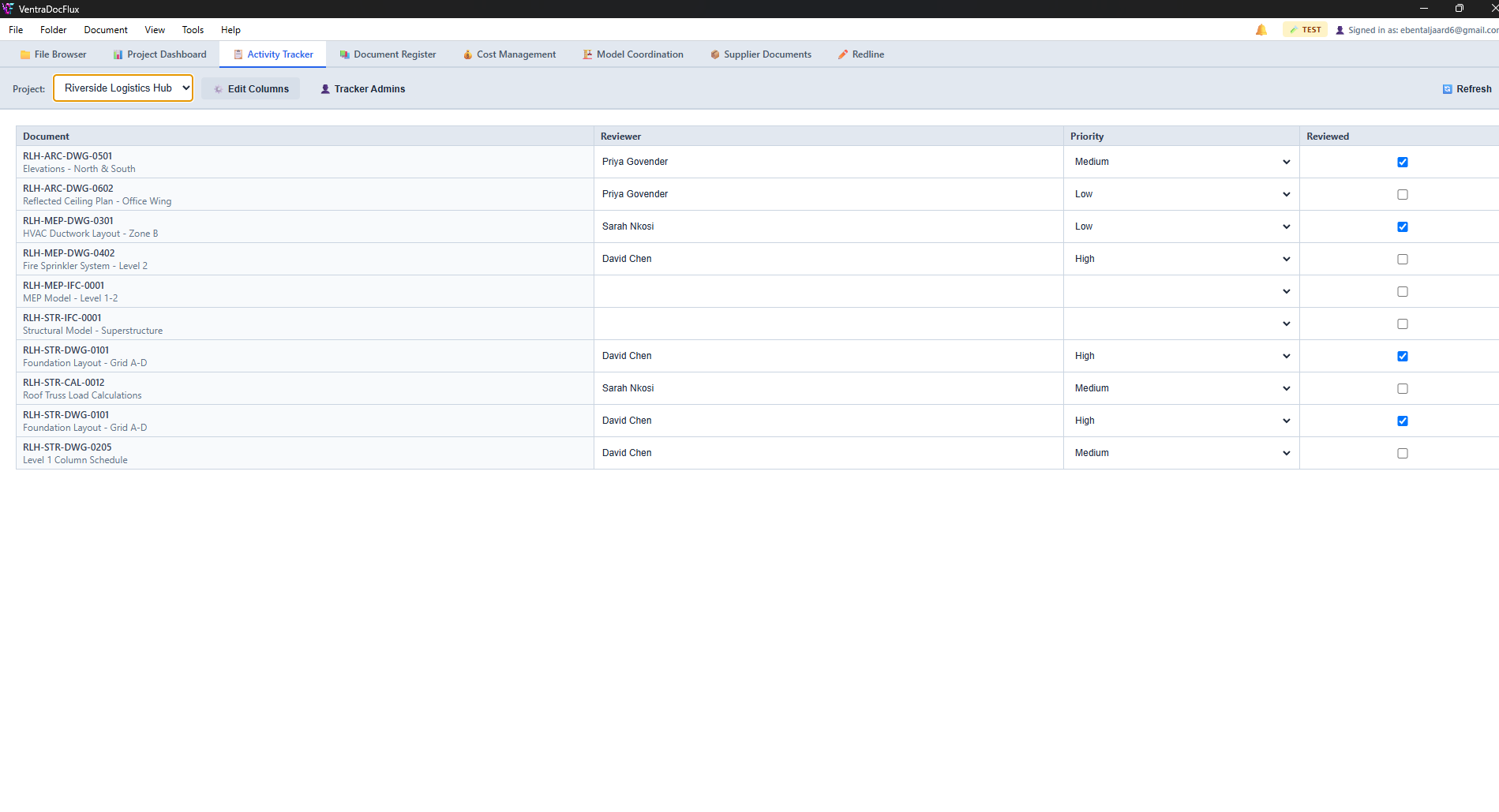
A spreadsheet-style view over your documents with columns you define yourself — text, dropdown, checkbox, or date — for whatever your team actually needs to track (reviewer, priority, sign-off) alongside each document, without leaving VDF.
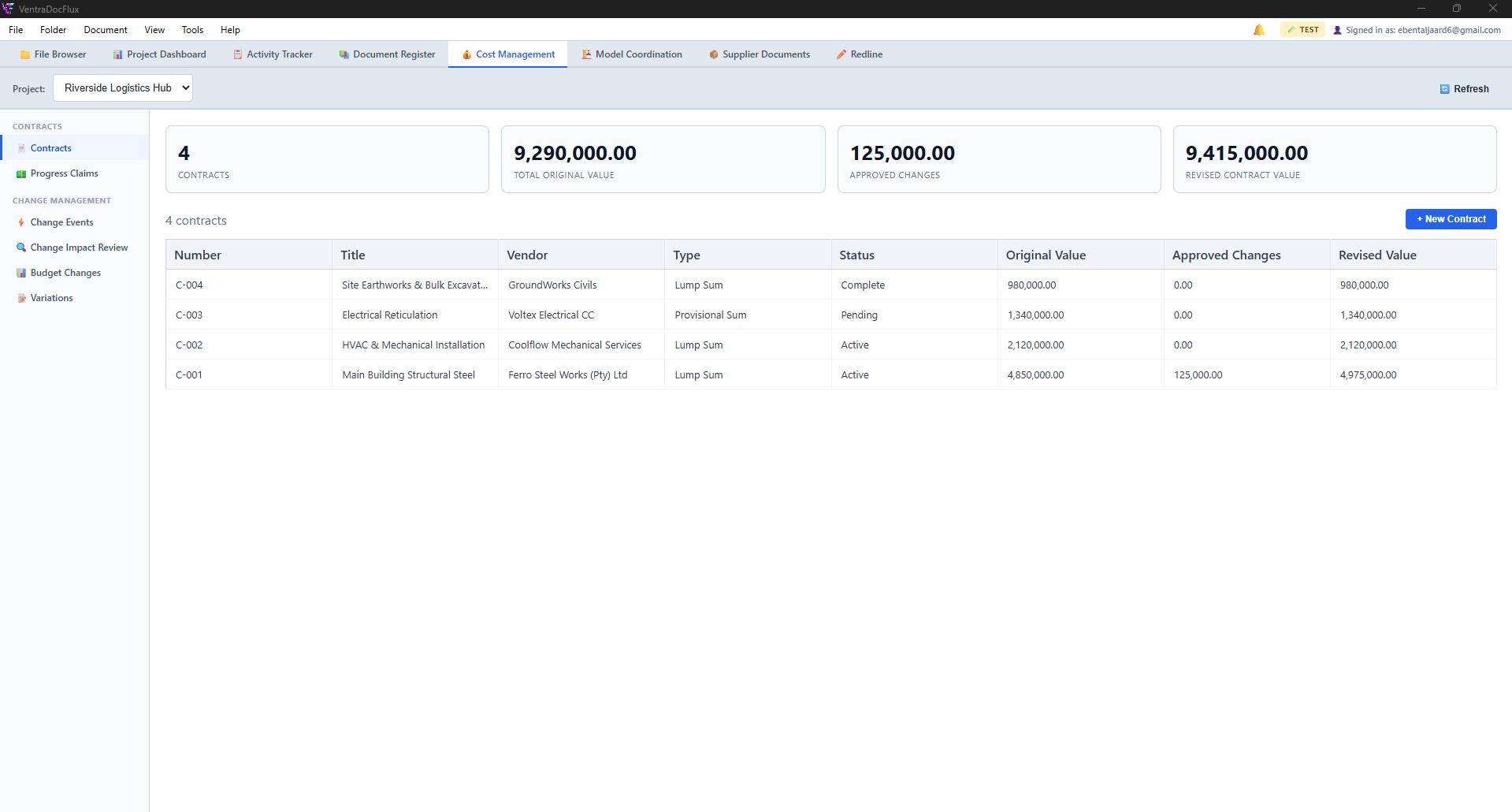
Track every contract on a project — original value, vendor, type, and status — with the revised value recalculated automatically as variations are approved, so it can never drift out of sync. Progress claims and budget changes are tracked against the same live figures.
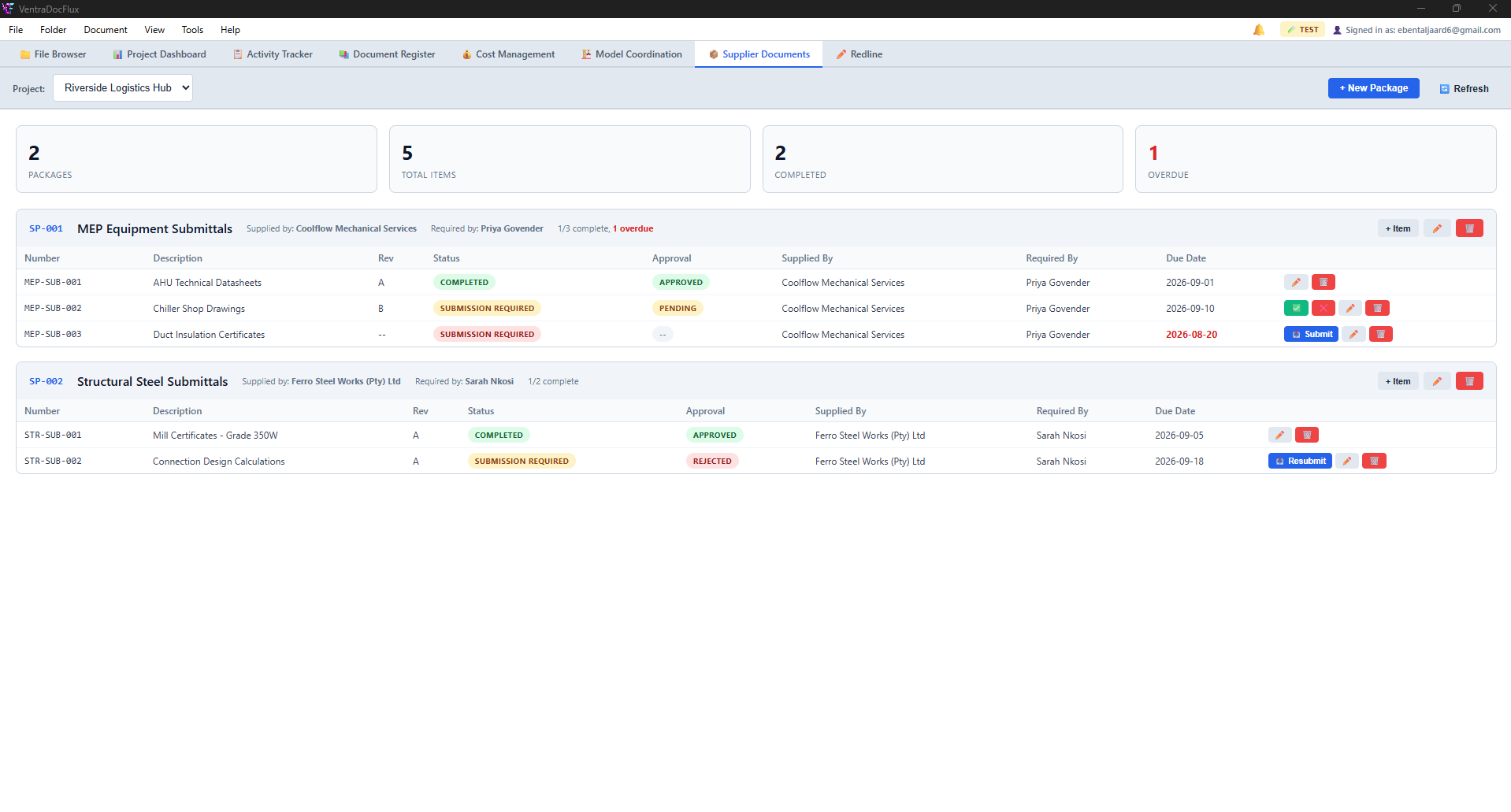
Track submittal packages against your suppliers — datasheets, shop drawings, certificates — each with its own due date and approval status. Overdue items are flagged automatically, so nothing quietly slips past its date.
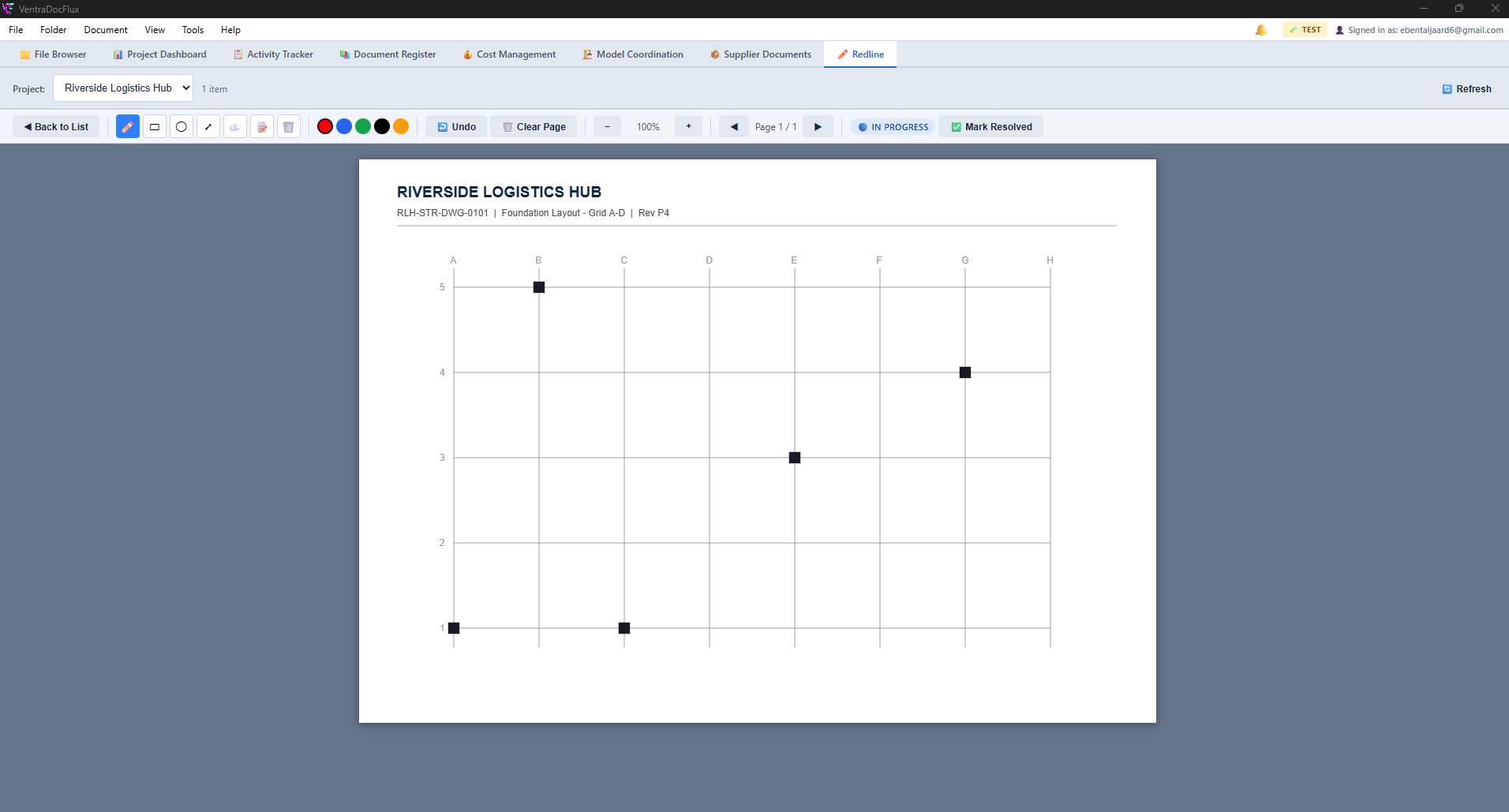
Mark up a published PDF directly — draw, comment, and track each markup as outstanding, in progress, or resolved. The original stays untouched; every redline is layered on top and tied back to the document it belongs to.
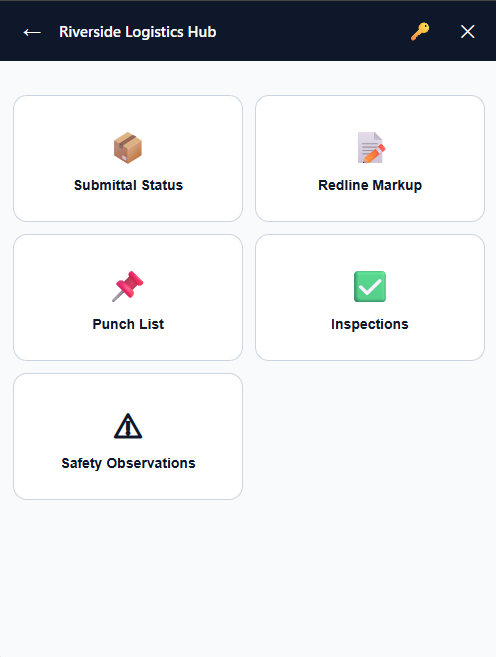
Punch Lists, Safety Observations, and Inspections from any phone or tablet browser — no app to install. Log a defect with photos and location, assign it, and track it through to resolution, all synced live with the desktop app for the rest of the team.
See It In Action
Full Pricing Breakdown
VentraDocFlux is priced per user seat, billed monthly. No setup fee, no other required fees — self-hosting your own Host Service (on your own server, NAS, or cloud-synced folder) costs nothing extra on our side.
Monthly per-seat pricing
Pricing is graduated like a tax bracket: each seat is billed at its own tier's rate, not your whole seat count at whichever tier it falls into. For example, 200 seats blend several tiers together rather than jumping to a single rate.
| Seats | Price per seat / month |
|---|---|
| 1–25 | R 300 |
| 26–50 | R 250 |
| 51–100 | R 200 |
| 101–200 | R 150 |
| 201–300 | R 120 |
All prices in South African Rand (ZAR), excluding VAT where applicable. For 300+ users, we put together a custom quote rather than pricing it automatically — see Contact.
Example
150 seats = (25 × R300) + (25 × R250) + (50 × R200) + (50 × R150) = R7,500 + R6,250 + R10,000 + R7,500 = R31,250/month. Your first payment is exactly that — the first month's seats, nothing added.
Billing & changes
- Billed automatically to the payment method on file, via Paystack.
- An Admin can add a seat at any time from within VDF; if you're at your seat limit, adding one automatically grows your paid seat count and next month's bill reflects it — you're always told the new total when this happens.
- Changing or cancelling your subscription doesn't prorate mid-cycle — see our Cancellation & Refund Policy.
Terms & Conditions
These Terms & Conditions ("Terms") govern access to and use of VentraDocFlux ("VDF", "the Software") and this website, provided by BreVox Group ("BreVox", "we", "us"). By creating an account, subscribing, or using the Software, you agree to these Terms on behalf of yourself and, if applicable, the company you represent ("Customer", "you").
1. The Service
VDF is a licensed, per-seat document management application, provided as a desktop application together with a licensing/account backend and, optionally, a self-hosted Field module for mobile/on-site access. Use of VDF is also governed by the End User License Agreement (EULA) provided with the Software; where the EULA and these Terms conflict on software licensing specifically, the EULA controls.
2. Accounts & Seats
- Your subscription grants a set number of user seats ("max seats"). Your company Admin can add or remove users up to that limit from within VDF or, where available, from the BreVox Group website.
- You're responsible for keeping your account credentials confidential and for all activity under your account.
3. Fees & Billing
- A recurring monthly per-seat fee, billed automatically to the payment method on file, via Paystack. There is no setup or signup fee — your first payment is just the first month.
- Per-seat pricing is graduated by tier — see current rates under Pricing, shown again at checkout before you pay. For 300+ users, pricing is quoted individually — contact sales.
- If a scheduled payment fails, we'll retry and notify you; after repeated failures your subscription may be marked past due and access suspended until payment succeeds.
- Except as required by law or stated otherwise, fees are non-refundable — see our Cancellation & Refund Policy for the full details and how to cancel.
4. Your Data
Documents, metadata, and other content you upload or create in VDF remain yours. We access it only as needed to provide the Service, investigate a support issue you raise, or as required by law. See our Privacy Policy for how personal data is handled.
5. Acceptable Use
You agree not to misuse the Service — including attempting to circumvent licensing or seat limits, reverse-engineering the Software beyond what applicable law permits, or using the Service to store or transmit unlawful content.
6. Availability & Support
We aim to keep the licensing/account backend available and to respond to support requests promptly, but we don't guarantee uninterrupted availability. Where you run your own self-hosted Field/Host service, its availability depends on your own infrastructure, not ours.
7. Warranty Disclaimer & Limitation of Liability
The Service is provided "as is", without warranties of any kind beyond those that cannot be excluded by law. To the fullest extent permitted by law, BreVox Group's total liability arising from these Terms or the Service is limited to the fees you paid us in the three months preceding the claim, and we are not liable for indirect or consequential losses.
8. Termination
You may cancel your subscription at any time; access continues until the end of the paid period. See our Cancellation & Refund Policy for how to cancel and what's refundable. We may suspend or terminate access for breach of these Terms, non-payment, or unlawful use, with notice where reasonably possible.
9. Changes to These Terms
We may update these Terms from time to time; material changes will be posted here with an updated date. Continued use after a change means you accept the updated Terms.
10. Governing Law
These Terms are governed by the laws of South Africa.
11. Contact
Questions about these Terms? See our Contact page.
Privacy Policy
This Privacy Policy explains what personal information BreVox Group ("BreVox", "we") collects through this website and the VentraDocFlux (VDF) software, and how we use, share, and protect it.
1. What We Collect
- Account & billing information: name, work email, company name, and payment details you provide when subscribing. Card details themselves are collected and processed directly by Paystack, our payment processor — we never see or store your full card number.
- Usage information: sign-in activity, seat/device information, and audit-trail entries generated by your use of VDF (e.g. who checked out or updated a document, and when) — this exists to give your company Admins an accurate audit history, a core feature of the Software.
- Your documents: the files and metadata you create or upload in VDF. In self-hosted (Host/Field) deployments, these live on infrastructure your company controls, not ours.
2. How We Use It
- To create and manage your account, and to provide and support the Service.
- To process payments and manage your subscription (via Paystack).
- To send service-related emails (e.g. invitations, billing notices, password resets) and, where you've agreed, product updates.
- To maintain security, prevent abuse, and meet legal obligations.
3. Who We Share It With
We share personal information only with the processors needed to run the Service:
- Supabase — hosts our authentication and application database.
- Paystack — processes subscription payments and stores your payment method on our behalf.
- Railway — hosts our licensing/billing backend service.
We don't sell personal information. We may disclose it if required by law, or to protect the rights, safety, or property of BreVox, our customers, or others.
4. Data Retention
We keep account and billing records for as long as your subscription is active and as needed afterward to meet legal, accounting, or dispute-resolution obligations. Documents in self-hosted deployments are retained under your own company's policies, since that data lives on your infrastructure.
5. Your Rights
Subject to applicable law (including South Africa's Protection of Personal Information Act, POPIA), you can ask us to access, correct, or delete the personal information we hold about you, or object to certain processing. Contact us using the details on our Contact page to make a request.
6. Security
We use reasonable technical and organizational measures to protect personal information, including encrypted transport (HTTPS/TLS) for data in transit. No system is completely secure, and we can't guarantee absolute security.
7. Cookies
This website uses only the cookies/local storage strictly needed for it to function and basic, privacy-respecting analytics. We don't use third-party advertising cookies.
8. Changes to This Policy
We may update this Privacy Policy from time to time; material changes will be posted here with an updated date.
9. Contact
Questions about this policy or your data? See our Contact page.
Cancellation & Refund Policy
This explains how to cancel your VentraDocFlux subscription and what, if anything, is refundable. It sits alongside, and doesn't replace, our Terms & Conditions.
How to cancel
Any company Admin can cancel directly from within VDF — open Manage Team and select Cancel Subscription. No email or waiting on us required, and you can undo it from the same screen any time before your current period ends, in case you change your mind.
Your access continues for the rest of the period you've already paid for. Once that period ends, billing stops and your account is deactivated — no partial period is charged after cancellation, and no further charges occur. If you can't get into VDF for some reason, email [email protected] from your company Admin's address instead and we'll cancel it on our end.
Refunds
- Monthly per-seat fees: non-refundable for the period already paid, including a period you cancel partway through — you keep access for the rest of that period instead of receiving a partial refund for it.
- Exceptions: if we've made a billing error (charged the wrong amount, charged after a confirmed cancellation, or similar), we'll correct it and refund the difference. If a scheduled payment fails and is never successfully retried, you're not charged for that period. Nothing here limits any refund right you have under South African consumer protection law that can't be excluded by agreement.
Seat changes
An Admin can change the billed seat count any time from the same Manage Team screen. Adding seats takes effect immediately and is billed from your next cycle. Reducing seats also takes effect on your next billing cycle, not immediately — there's no mid-cycle refund for a seat you stop using partway through a paid period.
Failed or disputed payments
If a scheduled charge fails, we retry automatically and notify you; repeated failures may suspend access until payment succeeds, as described in our Terms. If you believe a charge was made in error, email us before raising a dispute with your bank or card issuer — we're able to resolve most billing issues directly and faster that way.
Questions
See Pricing for current rates, or our Contact page for anything else.
Frequently Asked Questions
What is VentraDocFlux, and who is it for?
VentraDocFlux (VDF) is a document management system (DMS) built for engineering and construction teams. It manages the full document lifecycle — check-out, revisions, approvals — for CAD drawings, Office documents, PDFs, and scanned images, alongside purpose-built modules for Model Coordination, Transmittals, Supplier Document Tracking, and a mobile Field app.
Can I try it before I pay?
Yes — every new account starts with a free 7-day trial, no card required. You get two seats to explore the full desktop app, so you can try real collaboration features (checking a document in and out between two people) rather than using it solo. If you decide to continue, you upgrade directly from the app or the website and your existing account carries over — nothing to set up again.
How is VentraDocFlux priced?
Per user seat, billed monthly, on a graduated scale (see the Full Pricing Breakdown above for the exact tiers). No setup fee and no other required fees.
Can I change my seat count later?
Yes, any time — a company Admin adds or removes seats directly from Manage Team inside VDF. Adding a seat takes effect immediately and is billed from your next cycle; reducing seats also takes effect on your next cycle, so there is never a mid-cycle prorated charge or refund.
Can I cancel any time, and what happens to my documents?
Yes. Any Admin can cancel directly from Manage Team inside VDF, no email required, and access continues through the rest of the period you have already paid for. Your documents live in whatever storage location you connected — your own server, NAS, or a cloud-synced folder — so cancelling VDF never touches those files; it only stops your team’s access through the app once your paid period ends.
Where is my company’s data actually stored?
You choose. VDF can run against a plain local folder, a shared network location, or your own self-hosted Host Service — any server, NAS, or cloud-synced folder you control. There is no requirement to store your project files on our infrastructure at all; account and billing details are kept separately through our licensing service.
Does it integrate with AutoCAD, Word, and Excel?
Yes — VDF ships with plugins for AutoCAD (2024–2027), Word, and Excel, so check-out, revisions, and document status live inside the tools your team already uses, rather than as a separate step.
Can I search inside my documents, not just by file name?
Yes. Right-click a file and choose "Index Content for Search" and VDF pulls the text out of it so it shows up in Advanced Search. Scanned PDFs and photos go through offline OCR (nothing sent over the internet), Word and Excel files are read directly, and AutoCAD drawings are read straight out of the drawing by the VDF plugin, kept current every time you save.
Can field workers use it without installing anything?
Yes — Punch Lists, Safety Observations, and Inspections are available through a mobile web app that works in any phone or tablet browser, synced live with the desktop app. Nothing to install on-site.
What is the ISO 19650 template, and do I have to use it?
It is entirely optional. By default, your naming conventions and approval workflow are fully configurable to match however your team already works. If you would rather start from a recognized standard instead, VDF ships with a built-in ISO 19650 naming and workflow template you can apply to any Environment Profile in one click, then adjust from there.
How do updates work — do I need to reinstall manually?
No. VDF checks for updates automatically and installs them itself; you will just see a normal restart prompt when a new version is ready. No manual downloads needed for an existing install.
What happens if my team loses connection to our document server?
If you are using a self-hosted Host Service and it becomes temporarily unreachable, VDF automatically falls back to a read-only cached view of your most recently synced documents, so your team can keep referencing them. Normal read/write access resumes automatically once the connection is back.
Downloads
Checking for the latest version…
Reviews & Suggestions
Loading reviews…
Help Shape Our Next Product
Your feedback drives our development. We are always looking for ways to improve our current software and build new tools that benefit all our users. If you have a feature request or a concept for a new application, please submit it below.
Note: While we love hearing your ideas for our general catalog, we do not currently accept contracts for custom or bespoke development work.
Reviews are checked before they go live, so yours won't appear immediately.
Pricing & Subscription

From R 300/seat
- Check-Out, Revisions & Approval Workflow
- AutoCAD, Word & Excel Plugins
- Model Coordination & Clash Detection (IFC)
- Mobile Field App — Punch Lists & Safety
- Multi-Language Interface & Full-Text Search
Secure checkout via Paystack